Showing posts with label 3dprinter. Show all posts

Tuesday, June 23, 2015

Video : Formlabs Releases New Resin TOUGH!

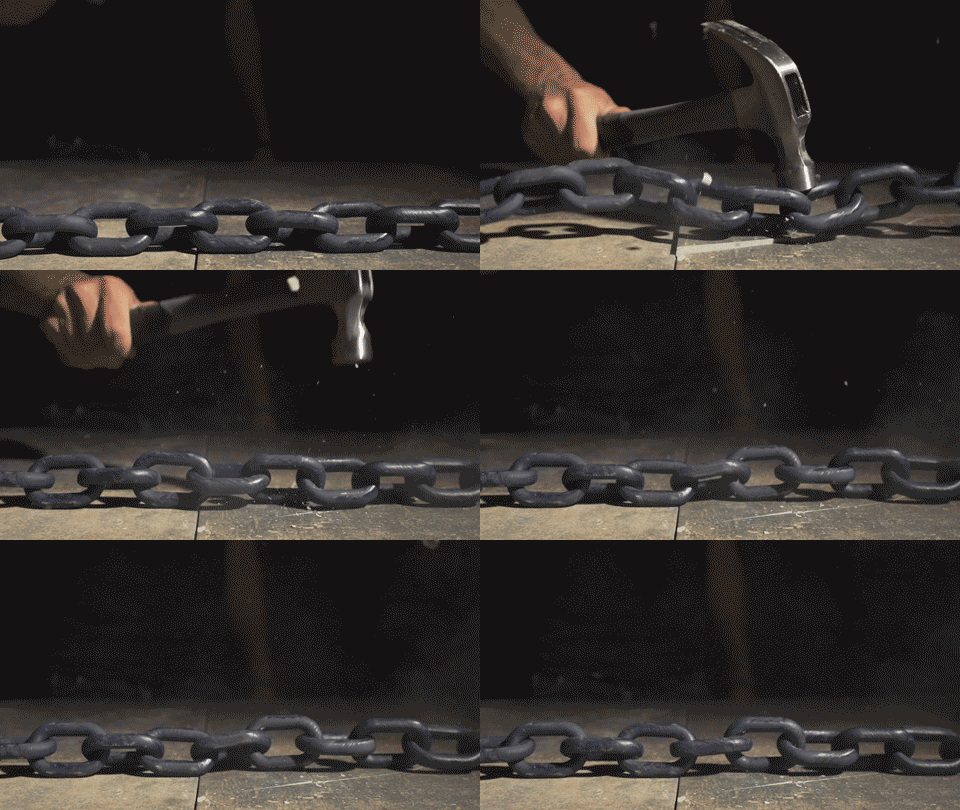
So i received a email today telling me about Formlabs new resin TOUGH!  It looks like it currently only comes in one color, a cornflower blue semi-translucent resin.  It is supposed to be tough, durable, and used in a variety of ways where ABS is normally used.  From the video and the gif below, the results are pretty impressive!

However the sticker price for 1L is the shocker, $175.00!!  More expensive than any of their other resins!  I'm not sure this is a good thing as other companies are producing similar (normal) resins at a fraction of the cost, and its only a matter of time before a similar (tough) resin can be had for cheap.  
I guess this is similar to Makerbot vs other fdm manufacturers, the highly visible company has to charge a premium for their "brand" even though its the same chemicals in the end.  

But if people pay for it, who am I to judge?  For me personally I'll shop around for a better price, or dare I say attempt to create my own! :)  


Hope you enjoyed this post and thanks for stopping by!

Friday, June 12, 2015

Hot Glue Can Save Your Failing Print, Maybe...

Over at Make Andrew Terranova shows how using a little hot glue on a failing print might be all you need to save it!  


Essentially the print was skipping a few layers so he added some hot glue and the print was saved.  Head over to make and read his article  about how he came up with the process and how he uses it to save some of this failing prints on his 3d printer.

I like the idea and for one I plan on using the technique myself if my print starts to fail... great work!


Hope you enjoyed this post and thanks for stopping by!

Thursday, February 5, 2015

3D Printing : Cold Vapor Smoothing

you can click on all the pics for larger views!
So I've been working on this Nexus 7 w/Battery Charger Holder/Stand (Prototype) which originated with this model on thingiverse http://www.thingiverse.com/thing:355918 .

Its an ok design, but the cable goes out the side instead of straight back, the stand itself slides around unless affixed to a surface even with the battery in the mount providing a bit a weight, and the magnet is so strong between the charger and the nexus7 that more than often the charger puck gets pulled out of the stand.  Not to mention that as presented its almost impossible to print on some printers.

So I took the design and tweaked it, I separated it into two sections so any printer can print it, I also placed in a small divot in the back of the charger area for some velcro or adhesive strips, as well as divots on the bottom to hold the stand in place on a surface, and included a "spinner" device so you can orient the viewing angle. 

However this post is really about the "finish" of the stand.  Being that I'm using ABS plastic which "melts/dissolves" in acetone you can use a process called vapor polishing to give your products a injected molded look. (You can't use acetone with PLA or other similar plastics, each plastic usually has its own chemical that similar effects can be achieved however some of those are really nasty compounds and I'd avoid using them in a process like this.)

There are typically two methods to do this and both are similar, one method uses added heat to hurry the vapor process and "melting" of the plastic along with a breif stint in the freeze of the object you want to smooth before you put it in to the hot vapor path.

The other method is using the same process minus the added heat and stint in the freezer.  This is the cold process

Tuesday, January 6, 2015

3D Printing : IKEA Hack - Lustifik Shelf Extension - Filament Holder

Filament! I've got plenty, but I'm always looking for more, especially if there are new blends, new materials, etc! I really like testing out new filament and thinking on the possibilities that these materials could end up becoming or how to use them.  Its one of the reasons I got the replicator 2x "experimental", which I regret, since that is so far from the truth.  But that's for another show ;)  Thankfully I have a delta printer as well! :D

With so much filament, 64 or so spools at last count, I was just stacking it on my shelves as wide as the shelf, two spools deep and two  or three spools high.  But this was a bit unwieldy and the spools had a tendency to slide, especially if I stacked them three high.

initial prototype no channel, testing
out the strength with filament
support added in (the white) 
I started using peg board to hang my spools of filament from and had everything arranged via ROYGBIV designation, but I noticed that even a few of my ABS spools were taking on moisture, so I'm was sure my PLA that was sitting out in the open too would be troublesome in the future.  You can read about a solution I constructed to help "dry" out spools.  While its a good solution  when needed, I didn't want to have to do this every time so I needed to make sure they remained bagged with desiccant. When I rearranged the peg board I could only fit 2 spools on top of two peg board pegs.  I needed a better solution.


I had an extra IKEA Lustifik shelf and when put side by side i could fit about 6-8 spools per shelf (depending on the thickness of the spools)  which was a much better solution.  You can also flip another Lustifik shelf on top of the initial shelf and attach via bolts however you're left with a "middle shelf" that's about an one inch high. Here is a pic of the starting of the "shelf tower".  As you might guess the"plugs" that attach two units will create a small shelf, which I plan to use for sample filaments I receive from manufacturers or unspooled filament, like laywood, or laybrick.

you can click on any of these pics to make them full size!

I designed the following files to fit between the two units and free up that space.


The rods extend between the two units when you flip the shelving units, the plugs are for the upside unit, where you remove the no scuff feet and insert those plugs so that you can join another unit together.


As you can see I print out 8 "halves" and then use the adhesive below, but you can straight acetone to "weld" the two halves together as well.  The larger holes are there to save on material, the smaller holes are there, if you want, to use as an additional method to strengthen the object by using 1.75mm filament which you put adhesive on and then slide into the holes which then are welded/bonded to the plug (as can be seen in the pic on the right) or strut.  After gluing I decided the extra filament welds weren't needed, those struts and plugs are plenty strong!  

The final feature is a channel going down the center to allow you to insert a 2in bolt/machine screw along with a nylon hex nut that fits in the 2nd hole from each side that goes through the tubing on the shelf unit.  With a bit of screwing the hexnut should retract and come to rest between the two circular holes with in the strut and provide extra added strength.  Oh and I got my adhesive at Tap Plastics here in San Jose, CA.  


As you can see in the last photo the print on the delta, this is with ABS, even though it has a heated bed with no "enclosure" the plastic really wants to "warp" and it pulling up the blue tape!

Hope you enjoyed this post and thanks for stopping by!

Friday, November 21, 2014

3D Printing Video : Printing With Ninjaflex and Rubber TPE

So with the holidays arriving soon, I again wanted to make some gifts this year for various relatives and friends who I'll be spending the holidays with.  While searching thingiverse i found this pretty cool Bear model in the Voronoi style.

So after printing it in a transparently blue PLA filament from polymakr, I decided to try out some of the flexible filaments I've had on hand for awhile but have done nothing more than print a sample chip out .


(if you're a filament manufacturer and want me to test a sample of a filament you're developing feel free to contact me)
I tried printing out with this type of filament before, and failed, mostly because either the extruder that I was using caused the filament to buckle and just wrap itself around the stepper motor, or after extruding a bit for the first few layers would just stop extruding as the gripper gear would just lose its grip and not push the filament along ending up in "air prints".  

Being that I have about 15 rolls of various flex materials I figured I better start using these filament and decided to try various methods of getting these filament to print correctly. (read and see more after the jump!)

Friday, August 22, 2014

3D Printing : Burning Man 2014 Edition!

Design by Larry Harvey and Don Clarke, illustration by Andrew Johnstone and Jim Pire
So last year a friend of mine / co-worker, who is a die hard Burning Man attendee, decided he wanted to give out something at burning man to individuals whom he either wanted to "barter with" or just thought that they were some cool people.  

click to embiggen
My friend knew of my purchase of a 3d printer and he inquired about the ability to possibly develop some pendants to wear with minimal cost  to mass produce.  So I indicated we could use the 3d printer to produce a small run of objects then he could go about casting them in silicone and then in resin.  So we did exactly just that.  With the help of Taps Plastics (a local store where you can pic up the silcone casting materials and casting resin)  Well I printed out about 20 or so "master copies" of a necklace or pendant.   We then used some platinum silicone, mainly for its speed in curing, and then he spent the weeks leading up to burning man casting copies of the masters in a white resin.  After my friend then went about painting them in various colors and placing them on lanyards of various colors and materials.  From what was told to me was that He had cast about 100 or so, and ended up  handing out about 60 or so. 

click to embiggen
So this year with burning man approaching, he then again asked me if we could develop a new pendant.  However this time around he didn't want to spend the time casting and painting and asked if we could do everything on the 3d printer, which I replied sure we can do that if you'd like, but the cost would likely be more for less product.  He was ok with this, since he didn't have to do any real work except for final assembly. (prototypes to the left)

So over the last week I've spent my free time printing out the new pendant, its fairly simple and I only used one print head and use the z-axis stop on the makerbot to change out colors.  the initial design was just a flat .jpg/.png and I used my 3d application, cinema4d( version 7 that I had purchased years ago) to add some depth for each "layer" then extruded those layers to match 1mm increments to make color changing easier because that is what the makerbot uses, mm instead of actual layers to pause at the z-axis.  

final result and color scheme
(click to embiggen)
So The base layer was 2mm, the flames were 1mm, the burning man was 2 mm, and the final black was 1 mm for a total of 6mm in height or depth however you want to look at it.  

So if you're at burning man and see a guy giving out these pendants/necklaces say "HI" or if you see someone wearing them tell them you know of the pendants origin story, of a lazy friend with a 3d printer! ;)  

Hope you enjoyed this post and thanks for stopping by!

Monday, April 14, 2014

3D Printing : Colorizing your filaments!

I came across a blog from Rich @ richrap.com, who by using nylon and some rit fabric dyes was able to make some very useful vases and object with his 3d printer.  I also came across this object on thingiverse which allows you to color white or clear (or really any filament) using sharpie markers:


So I ended up picking up some sharpie markers from amazon and decide to have a go a colorizing my filaments.  Here is the video below: (bonus stay to the end and see the polymakr filaments as well as a test of the uv sensitive filaments with a blue laser! :D) 


I saw this little project on thingiverse today and figured I should include the object, its for testing out nylon and rit dyes vs how many hours you leave the samples in the dye.  Very useful to have samples for what can be done and what effects you're capable of when planning new projects or objects!


Hope you enjoyed this post and thanks for stopping by!

Thursday, October 24, 2013

3D Printing : Grocery Bag Holder and a Ash Tray Piston!


Two more things a friend wanted prints of.  The first is an piston ashtray @ 200 micron layer 235c and 115c hpb, 25% infill supports and raft as it printed on its side.  Print head speeds were cut in half. Apparently its a gift for another friend.  The filament is 3d2print's "Silver" which is more of shiny gray.

The second items was a grocery bag holder @ 300 micron layer 235c and 115c hpb, 35% infill for structural intergreity, and printed it at full print head speeds.  This is a gift for my friends girl friend.  The filament is 3d2print's Black.
Hope you enjoyed this post and thanks for stopping by!

Saturday, September 7, 2013

3d Printing : Universal Trimmer Line As Filament! (weed wacker line)

"weed wacker line"
(click to embiggen any photos on my blog)
So awhile back I read an article about using trimmer line, or as its commonly knows as "weed wacker line", as filament in a 3d printer.  Some people have suggested that its nylon, but some others say it may contain other things as well and could be of issue when used in 3d printers.  I did a cursory search for the msds but didn't fine anything worth while.  

So, I went to homedepot and picked up a few rolls of various colors and sizes from pretty much the only the one brand they had Rino.  After getting them all home I came to realize that only one of the filament would fit into my 3dprinter that uses 1.75 mm filament which is the "blue" universal trimmer line which is 1.65 mm.  It cost $7.98. There was a green trimmer line that measured 2.0 mm but just wouldn't fit into the printers hot end.  I'm guessing you need filament that is 1.95 mm or smaller for use in the 3d printers that require 1.75 mm.  Back to the store and returned all of the other filament the next day since I hadn't opened the rest of the trimmer line packages. The focus of my tests would be with the blue 1.65 trimmer line.

When printing, I used both blue tape and cereal box cardboard as a printing surface.  The more celouse the base the better "stick" you'll get but blue painter's tape seems to be the best of both "stick to hold" onto the print bed and the ability to "release" the print afterward.  The cereal box (non shiny side) really held on to the print and even tore away at the cereal box more than anything after printing.  So i'd recommend using blue painters tape for a print bed surface.

So what are my findings? 235c seems to be the best temp for printing this particular brand of line trimmer.  Also having a heated print bed is beneficial, but regardless I was getting a lot of warp in tall prints and ultimately the print head would hit a print and then all hell would break loose and i'd have to cancel the print.
(read more after the jump)

Thursday, August 22, 2013

Filament Rolls Galore! From Protoparadigm!

(click to embiggen)


Check it out! 10 rolls of the stuff! WOOT! Lots of fun colors to print with!  I got these from the folks over at Protoparadigm ! I wanted to augment my printing with some alternate shades and hues of color vs the standard red, blue, yellow, green, black, and white, of most other manufacturers.  I can't wait to print out test print chips for these fun colors. (note two of the colors are also from their florescent line, i think the top right two in the second column, violet and hot pink!)

One thing I also wanted to say was that I ordered these at 1am on Aug 20th and received them today Aug 22nd! Talk about FAST!  The other cool thing is that they have free shipping on orders over $300 bucks! (not sure if that's a standard or a one time thing.)

I'll include these on my test report when I finally do the write up for all the filament that I have, which so far is i think 42 and counting. :)

Hope you enjoyed this post and thanks for stopping by!

Tuesday, August 20, 2013

3D Print & Video : Multi Scoops! (5hrs @ 200 microns)

Check the quick video after the jump of the multiple scoops print almost complete.  This was on a Makerbot Replicator2x. The scoops are printed in 3d2Print.net translucent ABS filament, 5hrs print time @ 200 microns, 228c print head 90c heated print bed, 2 shells with 5% infill, other settings are default makerware.

Friday, August 9, 2013

3D Print : Custom Made Sugar Scoops

Initial testing of various orientations for printing out this custom designed sugar scoop in one piece.  In the end created a two part print, first part handle and second part scoop, which resulted in the "cleanest" finished product. (can be seen as the largest scoop).
Custom Designed Sugar Scoops Printed using 3d2print.net Orange Filament
(ph235c 50spe 150spt 01sh 100in 100u hpb115c)
Hope you enjoyed this post and thanks for stopping by!

Wednesday, August 7, 2013

3D Print: Ring Sizing Bands

Ring Sizing Bands using seacans.com "Maroon" colored filament.
(ph235c 50spe 150spt 01sh 100in 100u hpb115c)http://www.thingiverse.com/thing:11458


Hope you enjoyed this post and thanks for stopping by!

Monday, August 5, 2013

3D Print: Allen Wrench Support

Allen Wrench support using 3d2print.net Orange Filament
(ph235c 50spe 150spt 01sh 100in 100u hpb115c)
http://www.thingiverse.com/thing:39037


Hope you enjoyed this post and thanks for stopping by!

Wednesday, May 22, 2013

Part 3 - Maker Faire - I Purchased A Makerbot Replicator 2x, Again, and its on its Way!


(continued from Part 2)

Good News Everyone!  So I just talked to my contact, Dominik, at Makerbot, and tomorrow they are shipping me out my new Makerbot Replicator 2x!

So I should have it as soon as Friday, but more likely next week sometime. I'll make additional updates with the progress/out come once I receive the 2x and confirm its an actual Replicator 2x, dual extruder!  That's when the REAL fun will begin!

Dominik and the Makerbot support staff have been awesome and I'll be recommending them to all of my friends and co-workers who are looking to purchase a 3d printer.  That is as long as makerbot's shipping dept sends the correct one that is ;)

Hope you enjoyed this post and thanks for stopping by!

Tuesday, May 21, 2013

Part 2 - Maker Faire - I Purchased A Makerbot Replicator 2x! I Returned a Makerbot Replicator 2!


(continued from Part 1)

I was panicking. Maker Faire was only this weekend and I had only purchased a 1 day pass! I quickly sent of an email to the Makerbot SOA, Dominik, who gave me his card when I purchased the 3dprinter. I made a quick post on g+ of my woes of how and of the frustration that I was now feeling and not being able to print because I had to pack everything up and hope I could get let into the fair so I could do an exchange for the right model. I couldn't sleep that night until at 4am I finally fell asleep exhausted.

The following morning I woke up bright and early, made a post to Make on g+ directly asking for assistance as the number on the receipt went straight to automation, and I also called the SOA who I also could only get his voicemail.

It was then i decided to get there at 10 when the convention opened and would call Dominik again to see if he could come get me at the gate and work this issue out.

I arrived, because of traffic, at around 11:15 depite leaving at 9:40 as it supposed to be a 30min car ride.  I had the for thought to bring a hand truck with me to carry those boxes back to the Maker Shed Store.  When I got to the gate, I believe Jennifer was her name, sympathized with me and told me if I couldn't ring Dominick she would walk me in over to the Maker Shed, which she eventually did.

I then found Dominick and he indicated that indeed I could return the printer but however because Makerbot shipping department they completely dropped the ball and had boxed up and shipped out from NY Makerbot Replicator 2's in what Dominick was told to be Makerbot Replicator 2x's.  I'm not sure if there is a problem with Makerbot's Shipping Department because of other similar instances you can watch a video about HERE where this guy is claiming he only received what appears to be a empty chassie of a Makerbot, (which I think sounds like more of scam to me, but with this snafu who knows!)  Hopefully when my unit is shipped out there will be nothing wrong.  I expect some heads are going to roll on Monday for the shipping snafu's.


So Dominick indicated they didn't have ANY 2x's so I just wanted to return the machine and get my card credited back.  Dominick from Makerbot and Product curator for Maker Shed indicated that it wouldn't be an issue to credit my card, it did take a bit of back and forth to do a return on their ipad store software but it was accomplished.  For my troubles (along with having to pay for gas, pay for parking and my time and effort to lug this box back up to San Mateo from San Jose where I live) The gave me a free spool of filament in my choice of color (black) as well as a getting started Makerbot book, and in addition free shipping when I order another 3d machine on Tuesday. (I'm calling Dominick to order and make sure I get a Replicator 2x)


This is why good customer service is KING no matter what business you are in.  There were other printers right by the Makerbot in the Maker Shed, including the Ultimaker, I could have at any point said "fuck it I'm through with Makerbot Industries and I'm going with another 3d printer.  But both Dominick from Makerbot and the Product Curator Michael from Maker Shed took very good care of me, and its the SOLE reason that I'm sticking with the Makerbot Replicator 2x and Makerbot Industries.

I'll make a new post if something goes wonky with the shipment of the new printer, or if I again receive a Replicator 2 instead of a 2x.

(continue to part 3)

Hope you enjoyed this post and thanks for stopping by!

Monday, May 20, 2013

Part 1 - Maker Faire - I Purchased A Makerbot Replicator 2x! I Returned a Makerbot Replicator 2!


Hello Readers!  You might be a bit confused by the title of this post, please let me explain my adventure with attempting to purchase a Makerbot Replicator 2x from Maker Faire 2013 in San Mateo.

I've been wanting a 3d printer ever since I saw my first reprap in action and then the Makerbot Cupcake.  I was hooked.  However, I placed a few criteria that had to be met before I would purchase any of the 3d Printers.

These were:

1. Dual Extruder.  It had to have a dual extruder so that it could be able to print out two materials at once either for dissolving supports structures or for a combined material say a rigid plastic with a rubber stretch silicone material for unique models and structures.  Also if I wanted to print in TWO colors that would be nice too ;)

2. Large Build Area.  The Build area had to be at least as large as a sheet of standard paper, e.g. 8x10x8, but then I refined that at 8x8x8, so a nice large qube!  (This I deviated a bit from.)

3. Accurate.  I'm still going to at some point pick up (or maybe make) my own stereo lithography printer which is the ultimate in fine detail when it comes to 3d printing, but from the cupcake to the Replicator there has pretty significant increased in the resolution between version of printers.  I wanted at minimum 100 micron layer resolution.  

With those met I would purchase my first 3d printer.  So when last year at Maker Faire in San Mateo, I noticed they were selling the Makerbot Replicator which seemed to meet all my requirements except the build area which is 11x6x6, I decided to wait until the dual extruder version came out.  Then they announced they metal Replicator 2 and its twin with a dual extruder the 2x.  I made decision that if the following year they had the 2x instock at Maker Faire that I would pick up the printer.

I saved all year long, and when it came time to purchase my Maker Faire Tickets I did so with the thoughts of that weekend I would be printing 3d objects to my hearts content!  Then the weekend arrived and we raced out to the convention center in San Mateo.  

I had a wonderful day taking pictures using a rig I constructed out of a light changing pole which you can find here on my photography blog, http://www.cluniephotography.com and Maker Faire was almost over, so we headed to the Maker Shed and low and behold I was told they had the Makerbot Replicator 2x in stock! WOOT!

I discussed the pros and cons of the dual extruder vs the single extruder ultimaker, Hey Ultimaker if you would have had a dual extruder I would have gone with your machine as the prints looks ot me a bit "finer" than the makerbot. (this is something I think they're doing with their software, e.g., either better cutting objects up for a better print or their printers were really "dialed" in to show off the quality.)  I then decided the ability to print out two materials was far more important, and purchase the Makerbot Replicator 2x! I paid $2799 and carted the box home.

Much to my dismay when I started to unpack it at around 10pm I noticed a few oddities in the unpacking video and manual.  I quickly looked and found only 1 extruder nozzel!  I then looked at the front name plate, it said Makerbot Replicator 2! Noooooooooo! They had given me the wrong model!

(head over to Part 2!)

Monday, October 1, 2012

Video : CEO of MakerBot Bre Pettis At The OHS!

So the release of the newest 3d printer from MakerBot Industries, the MakerBot Replicator MK2, created a brouhaha across the maker community with both detractors. Ok, quite a few detractors such as Josef Prusa Creator Of Prusa Mendel 3d Printer and Zachary Smith co-founder of MakerBot Industries, for starters , but a few kind of supporters such as Adafruit Industries.   There was/is even a revolt on thingaverse, the website where you can download "things" to print out on any 3d printer, which turns out was over the TOS.

Everyone was unsure of what it all meant and Bre tried to explain their position as best he could in a couple of blog posts, Here and Here, but never really did explain the issue people had with the replicator 2. Even in the comments when people were asking him directly again the question of open vs closed Bre stated 
"Folks really want a black or white answer, but in my experience, it just doesn’t work that way when combining open source, hardware, and business. There is an open hardware definition, but it’s a far throw from a business model."
So skip to the Open Hardware Summit, which Bre gave the keynote last year, and was scheduled to talk this year.  It was much anticipated on what he would talk about, would he try and explain further the position of open vs closed hardware that the Makerbot Replicator2 has taken, or would he speak about something entirely off the wall and non makerbot related?   Well here is the talk and I'll let you find out what Bre ends up discussing.  Be sure to watch the other parts of the talk in case you're interested in the OSH community.

(skip to 1:21:00, toward the end, for Bre's Talk)
Video streaming by Ustream


Hope you enjoyed this post and thanks for stopping by!

Friday, May 11, 2012

Makerbot TV S02E09 - Finishing Techniques

I haven't been following Makerbot Tv this season. I did come across an episode that answers the one question, that every maker of 3d printed objects has asked at some point.  How do I finish the objects that come out of 3d printers.  Here is the Makerbot crew explaining how they finish some of their projects.


I've heard of various other finishing techniques such as solvent dips, and other filler types where you more or less, as shown in the video, fill in the ridges to an even level using various compounds, such as clay, or automotive filler.  Then finished with a gloss protective coating.


Typically once you've created this "master model" a "master mold" is made out of silcone rubber and plaster and then copies are made out of various other materials.


Don't forget to head over to Makerbot.com and subscribe to their youtube channel if you want to follow all of the makerbot exploits.  


Hope you enjoyed this post and thanks for stopping by!

linkwithin

Related Posts Plugin for WordPress, Blogger...