Showing posts with label electronics. Show all posts

Thursday, February 7, 2013

DIY Battery Pack For Ingress!

Over at adafruit industries you can find this little circuit kit to charge up whatever device you would like for a mere $19.50 (you have to supply the case which can be almost anything!).

The device is called a "Minty Boost" after the tin is was initially designed around, a Altoids Mint Gum tin no bigger than the circuit and two AA batteries.  With this you get  582mAh!  You can also find mods to allow for a solar powered lipo battery version!

Rather than spend $40 for a largish, albeit sleek battery pack that does last 10000mAh, you can pick up this kit and tailor it to your whims.  As you can see I currently have normal duracell batt's in it, which I needed to use up.  For all my camera equipment I typically use these and plan to swap them out as soon as the duracell's wear out:

These are 2000-2500 mAh (depends on where you get them but I look for the 2350mAh ones)  I made a quick battery bandoleer and can fit on 3 more charges! Woot!


Initially I was going to use this kit in a dental floss container for super steath and a couple of AAA but the case was just too small.  

I then switched to this altoids tin and was still using a 3 AAA holder with spares stored on the sides of the battery holder, but that didn't seem to give the same bang for the buck, so to speak. 

I ended up with this current configuration though I'm thinking of using a three AA holder in place of the two AA holder.  

Right now you can see the blue tack putty in the bottom holding the batteries in and somewhat insulating the wires from the bottom of the tin.

This is great for the ingress game from google. This kit offers up the viability of long sessions and the ability to customize or "hide" it to your liking for prying enemy eyes!    

Hope you enjoyed this post and thanks for stopping by!

Thursday, January 24, 2013

Video - Don't worry, it's just ESD! (Electrostatic Discharge)

This is a pretty humorous video about electrostatic discharge.  ESD can be very hazardous to your electronics, and you should always wear a grounding bracelet or other such device.  Of course you always don't have this around and you should always ground yourself when handling electronic components   I typically hit my power supply or a piece of metal on my desk that is grounded to expel any static build up.

Watch now as Mehdi Sadaghdar shows us, in a funny way, why ESD is something to watch out for! Hehe.


Hope you enjoyed this post and thanks for stopping by!

Wednesday, August 22, 2012

Video : C2000 LaunchPad !

The folks over at TI have a new board out it's the C2000 LaunchPad! Here is some info from the website:

With all the hardware and software needed to start development, users can focus on learning or developing real-time control systems in areas such as digital lighting, motor control, digital power conversion, precision sensing, and much more.
Features
  • Pre-programmed C2000 Piccolo F28027 MCU
  • Built in isolated XDS100 JTAG Emulator enables real-time in-system programming and debugging via USB
  • CPU reset button and programmable push button
  • Enables development on any Piccolo F2802x device
  • Free unrestricted version of Code Composer Studio integrated development environment (IDE) v5
  • Free download of controlSUITE™ software with examples, libraries, application software and more
They created a video to go along with the launch of the board in the "billy mayes" infomercial style. Check it out below:


Hope you enjoyed this post and thanks for stopping by!


Tuesday, March 6, 2012

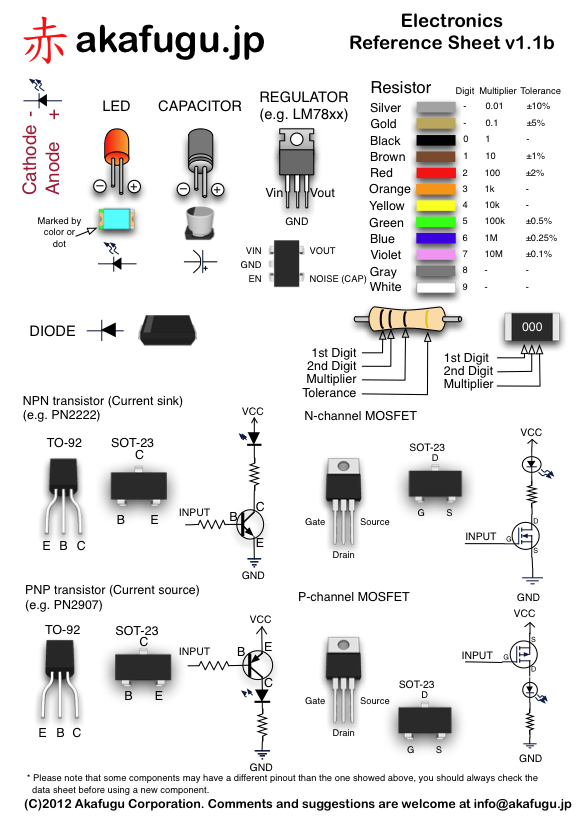
Electronics Reference Sheet - Print Your Own!

Over at  www.akafugu.jp they put up a set of great electronics reference sheets for those of us in the hobbyist world.  LED's, resistor color codes, transistors, capacitors, etc.  There is also a sheet on various pin-outs of some of the most often used microelectronics chips sets such as the ATMega and ATTiny.  The reference sheets are in .png and .pdf formats. Head over and download a copy and print them out for your personal use today!


Hope you enjoyed this post and thanks for stopping by!

Friday, March 2, 2012

Minestation - A Weather Station For Your Minecraft World

What do you get when you combine an Arduino shield and a love for the video game Minecraft? How about an awesome electronics build that will tell you how the weather is topside in your blocky world while you toil away in the depths of your elaborate labyrinth of mineshafts.  Its not often that a few of my hobbies overlap, unless its photography, as that tends to work its way into most everything I do, but this is pure genius.  


Over on the website www.radikaldesig.com (its in Spanish, and thanks to Google translate) they have the files for recreating your own, or you can eventually pick up one up once they get past the pre-alpha phase at minestation.me


Here is a nice video of it in action:


Hello Minestation! from minestation.me on Vimeo.


Hope you enjoyed this post and thanks for stopping by!

Monday, February 27, 2012

What is a Nanosecond - by Grace Hopper

This is a great video (on content, not on visual quality), showing exactly what a nano second, and a micro second, physically are using real world items. What other "imagined" abstract ideas can be explained so simply and elegantly?  If you have any cool videos or ideas like this to share shoot me an email and I'll include them in this post!


Hope you enjoyed this post and thanks for stopping by!
Wednesday, February 8, 2012

MSP430 Launchpad Booster Pack!

Just a quick post, I received the following email the other day in regards to a new booster pack for our MSP430's, its a Wireless Module! YAY!  Now you can natively add wireless to your MSP430 Launchpad products! Looks like the max order is 5, I picked up 3 for my 3 modules. Check out the info below and pick up a few for your own projects!

Here is the official email below:

Make Your MSP430 LaunchPad Wireless
430BOOST-CC110L RF BoosterPack
Texas Instruments
The 430BOOST-CC110L RF BoosterPack is a sub-1 GHz wireless connectivity plug-in board for the MSP430 LaunchPad development kit - an easy-to-use, affordable, and scalable introduction to the world of microcontrollers and the MSP430 family. Snap the 430BOOST-CC110L RF BoosterPack onto your LaunchPad and you are all set for adding wireless capabilities to MSP430-based designs.
RF BoosterPack
         Order Now         
430BOOST-CC110L RF BoosterPack
•Low-power wireless transceiver extension kit for use with the Texas Instruments MSP-EXP430G2 LaunchPad development kit
•Contains two ETSI-compliant and FCC certified RF module boards
•Sub-$30 for complete development environment: RF BoosterPack ($19) + two MSP430 LaunchPads ($4.30 x 2)
www.ti.com/rfboosterpack
SHARE THIS EMAILFacebookTwitterLinkedInDelicious
To ensure delivery to your inbox, please add tiprime@dlep14.itg.ti.com to your address book or safe sender list.

The platform bar is a trademark of Texas Instruments. All other trademarks are the property of their respective owners.

© 2012 Texas Instruments Incorporated, 12500 TI Blvd, Dallas, TX 75243. Read TI's Privacy Policy.


Hope you enjoyed this post and thanks for stopping by!

Friday, October 21, 2011

Palantir Anyone? - Sphere Made Of LED's

I think I found my next electronics build!  Behold this awesome mesmerizing light sphere made out of LED's!  Nikolai Nikitin created this "Magic Ball" and put all the diagrams and schematics up on his blog, here.  His site is originally in Russian but chrome browser/google translate does a good job deciphering it for us non Russian speakers.  It's a pretty amazing build, and gorgeous to look at!  Check out the video below:


The sphere is just so darn pretty to watch as it cycles through its patterns and sequences.  One thing I'd like to try with my version is to make a sphere mold and place the project in the center then fill the mold up with some clear or translucent resin, safe for electronics, and encase the entire, with a seperate resin plug for the on/off and battery changing.  


A Palantir !
I think translucent colors, or those colors swirled together, would be the way to go to mute the direct light flashes of the LED's, something akin to the palantir in the Lord of the Rings movies.  I suppose you could make or find an acrylic "hamster" like ball and put it in "loose" or secure it rather than go with a full resin fill.  Either way this is a great build and the ideas are flowing!  Hopefully there is no "Dark Lord" on the other end!


Hope you enjoyed this post and thanks for stopping by!

Friday, September 30, 2011

Wall Warts As Power Supplies For DIY Projects

Everyone's got them, an old power transformer or "wall wart" for some unknown electronic device that has been thrown away, was broken by the electronic gremlins, or lost into the sands of time.  


Some might throw out these unmatched power supplies but most just wrap the cord around the chunky black plastic cube and throw it into a box, which is only pawed through when the power supply to your existing device goes missing.  


One other use that might not have occurred to many is the use of those wall warts as the next power supply in your awesome DIY electronics project!


The folks over at digital-diy.com have a great, multipage, write up on how you can use these under utilized power supplies with your DIY electronics projects.  The article, nine pages to be exact, covers the following topics:

  • Background and Use of AC/DC Power Supplies
  • Linear Supplies
  • Regulated Supplies
  • Switching Power Supplies
  • Practicality Of Using AC/DC Power Supplies
  • A Brief Look At 5v Power Supplies

It's a great article and has very useful info, especially if you have any questions on how to incorporate power supplies into electronics projects.  


So go get that box of black cubes and twisted licorice strands and grab that chunky monkey one, you know from that one thing you had back in the 90's, that went "woop, woop woop" but now can't remember where you put it, yeah that one and put it back to use!


Hope you enjoyed this post and thanks for stopping by!

Wednesday, September 14, 2011

8x8 Matrix LED and Solar Power Boards - Launchpad MSP430

For those of us with the MSP430 Launchpad Microcontrollers these two products may be of interest and can be found over at olimex.com.


The First is a 8x8 LED board that has connectors for the launchpad as well as other 8x8 Matrix LED boards.  These left sided connectors allow you to chain a bunch together to form a scrolling readouts, animations, or other cool projects.  You could configure them in alternate ways too with a bit of wiring or some bending, I'm thinking of a cube! Also each board has a buzzer and a microphone! Here are the specs:

  • Launchpad connectors
  • LED8x8 brick connector
  • Microphone
  • Buzzer
  • FR-4, 1.5 mm (0,062"), red soldermask, white silkscreen component print
SUPPORTED DEVICES: all devices which can be used on MSP430-Launchpad
DIMENSIONS: 66x51 mm (2,6x2,0") 


You can find more info HERE.


The second product is a a Solar Panel Battery Charger.  This looks like it is to be used with a 1.2v single battery and will fully charge a 800mAh battery in 10hrs of direct sunlight.  So if you're designing a project with a lipo battery you can use this board to charge up your project when your power needs require it affording you have nice sunny days.  This could be adapted for many outdoor projects, e.g., low power monitoring station for a mini-greenhouse, lighting for the greenhouse, etc.  Here are the specs:

  • SOLAR PANEL 2.4VDC 80mA with DC/DC voltage boost converter
  • JTAG connector for direct plug in MSP430 2x7 JTAG connector to provide power for the target board
  • suitable for up to 800mAh rechargeble battery, 800mAh battery will be charged to 100% if MSP430-SOLAR is left for 10 hours on sun light
  • Dimensions: 56x48 mm (2.2x1.9")
You can find more info HERE.


Hope you enjoyed this post and thanks for stopping by!

Thursday, September 8, 2011

Makerbot TV! - Episode 1

Over at Makerbot industries they're now producing a weekly video series of everything "awesome" about anything having to do with the Makerbot.  The first video is up and weighs in at 5:46  min, so be sure to check it out after the jump.


I absolutely love 3D Printing and would certainly like to have a Makerbot, however I always wanted a larger build area and higher resolution that can be had with the Makerbot.  The rep rap series, of which the makerbot was birthed from, does have larger build areas but they too have similar issues with resolution of the prints. As noted in the video you can sand and smooth the plastic with a bit of sand paper and then wiping down with acetone to smooth out the lines.


One new prospect of home 3D printing is using a normal projector and UV sensitive resin for really high quality and durable prints.  The only drawback I see with this design again the size of the build area, as you have to have a wide "vat of resin" and since the printing occurs "upside down" you'd have to have a pretty tall z axis.  The other questions regarding this method is how sensitive is the resin to light?  In the videos its pretty clear the resin sits behind a protective plastic filter.  Do you have to drain the resin when the printer isn't in use?  The creator hasn't said too much but that it should be comparable to today's home 3D Printers in the $1000 price range.  Here is a video of some of his work:


Of course you could always just print an object in pieces and then puzzle it together.  To be honest most of my print projects wouldn't be anything more than an 8x10 ish size anyways.  Regardless of which printer you use, or even if you use a service like shapeways or ponoko 3D printing is a great way to get your design ideas out and into the world and getting people thinking of new and exciting things to do with them.  It is certainly the next step in custom manufacturing I think.

Thursday, November 11, 2010

Its MAGICKER! - A IKEA LAMP CONVERSION / HACK

Light at Half Power
Magicker is the "style" of the Ikea Lamp, which I don't even think its available anymore, that I use for my bookcase lamps.  The video explains why I did this conversion, which more or less was because these lamps were going through the $5.00 halogen bulbs like there was no tomorrow.  I had to replace both lamps bulbs once a month and the last straw was when I had to replace three bulbs in a months time.  


I have a suspect that it has something to do with the transformers the lamps used as they always ran very, very HOT and I even had one appear to have shorted out and scorched a power outlet not long after purchasing them!  The transformers were just a step down transformer which went from 120V AC to 12V AC.  My power in my apartment has never had a brown out or black out, which is surprising living in California, but I suspect that it has something to do likely being on the same power grid as the Hospital I live near.


So needless to say I decided to ditch the AC transformers and use a universal DC transformer, you know the kind that has a bunch of different barrels/connections on the ends for electronic games, and gadgets. This also saved me from having to wire up in my schematic going from AC to DC, which I was going to build my own LED board.  Then after a quick fry's electronic store trip I stumbled across these kits from digitron (don't bother looking for them on their site, its not listed yet).  The kits were $9.99, a bit pricy i know, but it had everything I wanted.  They're super bright have 6 lights with 3 bright white LED's (so technically 18 individual LED's) and could be used for either 12V AC or DC!  The cool thing is that if you want you could solder up a bunch together in various configurations and still only run one power source! You see they're designed with solder pads on each corner and once that connection is made power will flow along to all that are connected!  NEAT!  


Overall it was a fun conversion and i'm pretty happy with the outcome, the transformers no longer run HOT, and the light is a nice bright white which I can vary at a flick of a switch from just a faint glow for movie watching or full on "daylight" for reading.  


What I'd like to do in a future hack is add maybe a small controller board and wireless so that I can program a time schedule and turn them on/off wirelessly or some other wacky idea, strobing perhaps!


So if you're interested in seeing my explanation, about 8 mins, and then build process, its in time lapse, take a look at the video!


Hope you enjoyed this post and thanks for stopping by!

Thursday, July 15, 2010

MSP430 LaunchPad - Unboxing!

Today I received a fed-ex package around mid-afternoon.  I wasn't expecting anything so I opened it up and found the three MSP430 Launchpad's I had ordered a month ago for $12.90 total($4.30 each and shipping was free)!  I was surprised because shortly after ordering them I received an email indicating they were back ordered.  So I'm pretty happy and have been thinking about the projects I'll be using these boards for.  Here are a few quick un-boxing pictures for ya!


Don't forget to comment, or ask any questions below! 

Hope you enjoyed this post and thanks for stopping by!

linkwithin

Related Posts Plugin for WordPress, Blogger...